Booking software for Pilates, yoga, barre and fitness studios

Clients book on their own. You stop answering WhatsApps.

Corelia is your studio’s website, app and admin panel: bookings, payments and clients in one place, under your brand.

  • No card needed
  • No contract
  • Ready in an afternoon
Style: Natural

Built at DOM Movement, Estepona (Spain). A Pilates, yoga and barre studio uses it every day for its bookings, class packs and clients.

Corelia in 1 minute

Booking software for Pilates, yoga, barre and fitness studios

Six things it does for you. Tap one to see it in detail.

Everything it covers

Eight areas, one tool. No paid add-on modules.

What Corelia includes, at a glance

Who it’s for
  • Reformer and mat Pilates
  • Yoga
  • Barre
  • Functional training
  • Sports centres
  • From 1 room to several locations
Bookings
  • Weekly schedule
  • One-off classes and events
  • Spots per room
  • Automatic waitlist
  • Cancellation window
  • Recurring spots
Payments
  • Drop-ins
  • Credit packs
  • Monthly memberships
  • Card, Apple Pay and Google Pay
  • Local methods
  • Pay at the studio
  • Monthly plans paid in person
Clients
  • A profile for every client
  • Credits
  • History
  • One-tap sign-up
  • Notifications
Your website
  • Multiple pages
  • Map
  • Ready for Google and ChatGPT
  • English and Spanish
  • Your own domain Pro (Included in the Pro plan)
Your app
  • Installs from your website
  • With your icon
  • Phone notifications
Your panel
  • “Today”
  • Drag-and-drop calendar
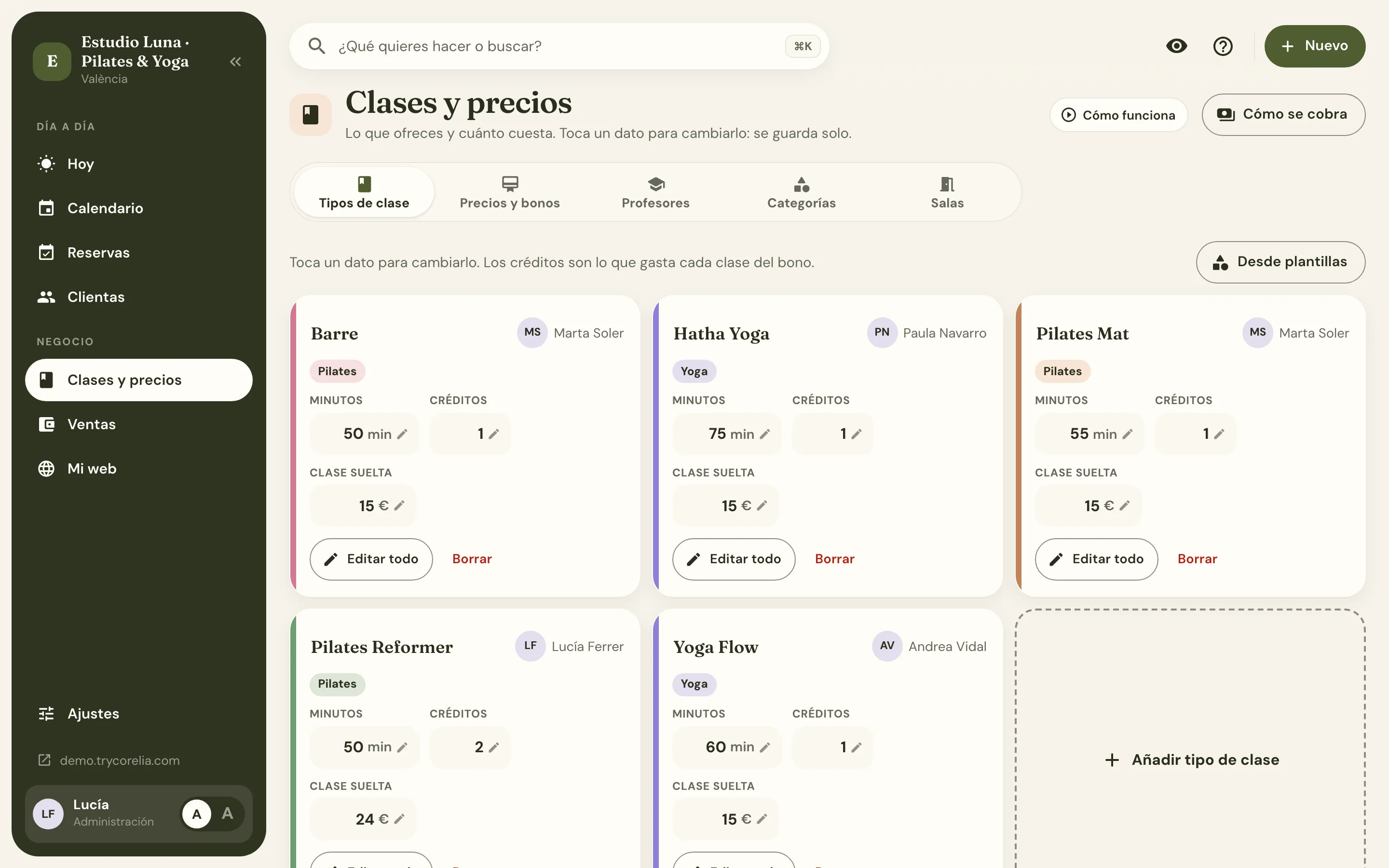
  • Classes and prices
  • Sales
  • Monthly close for your accountant
Your brand
  • 8 styles
  • 80 palettes
  • Your fonts
  • Your logo
  • On website, app and panel

It’s all in the 2-month trial, no card needed. See pricing

Sound familiar?

Running a studio is hard enough.

  • Before: “Is there a spot on Tuesday?”

    They book on their own, any time.

    No more notebook: you see who’s coming instantly.

  • Before: An app that isn’t yours.

    Your name, not another app’s.

    Clients see your brand, and you pay no fee per booking.

  • Before: A website nobody finds.

    Get found on Google.

    A fast site that shows up when they search “Pilates near me”.

How it works

Ready in an afternoon. Nothing technical.

  1. Sign up (2 minutes).

    Your studio name and email. No card.

  2. Make it yours (one afternoon).

    We guide you step by step: schedule, prices, colours and logo.

  3. Share your link.

    On WhatsApp or with the QR poster at the front desk. Clients start booking that same day.

Chapter 1 · Bookings

Clients book on their own, any time.

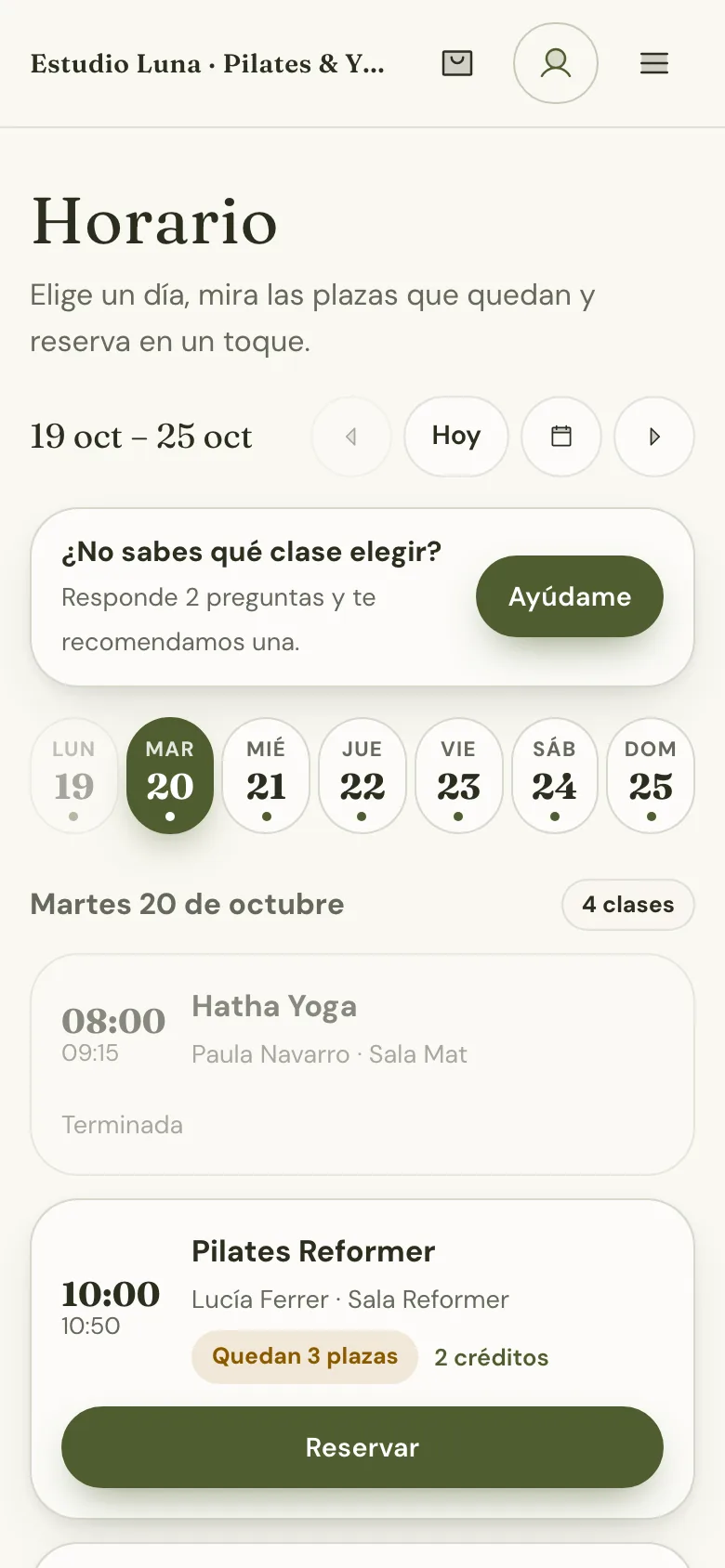
They see your schedule on their phone, book in two taps, and you find out without picking up the phone.

  • Weekly schedule, one-off classes and events. With spots per room: when it’s full, it closes itself.
  • Automatic waitlist. If someone cancels, the spot goes to the next person on the list.
  • Cancellation window and recurring spots. You decide how late they can cancel; recurring spots book themselves.
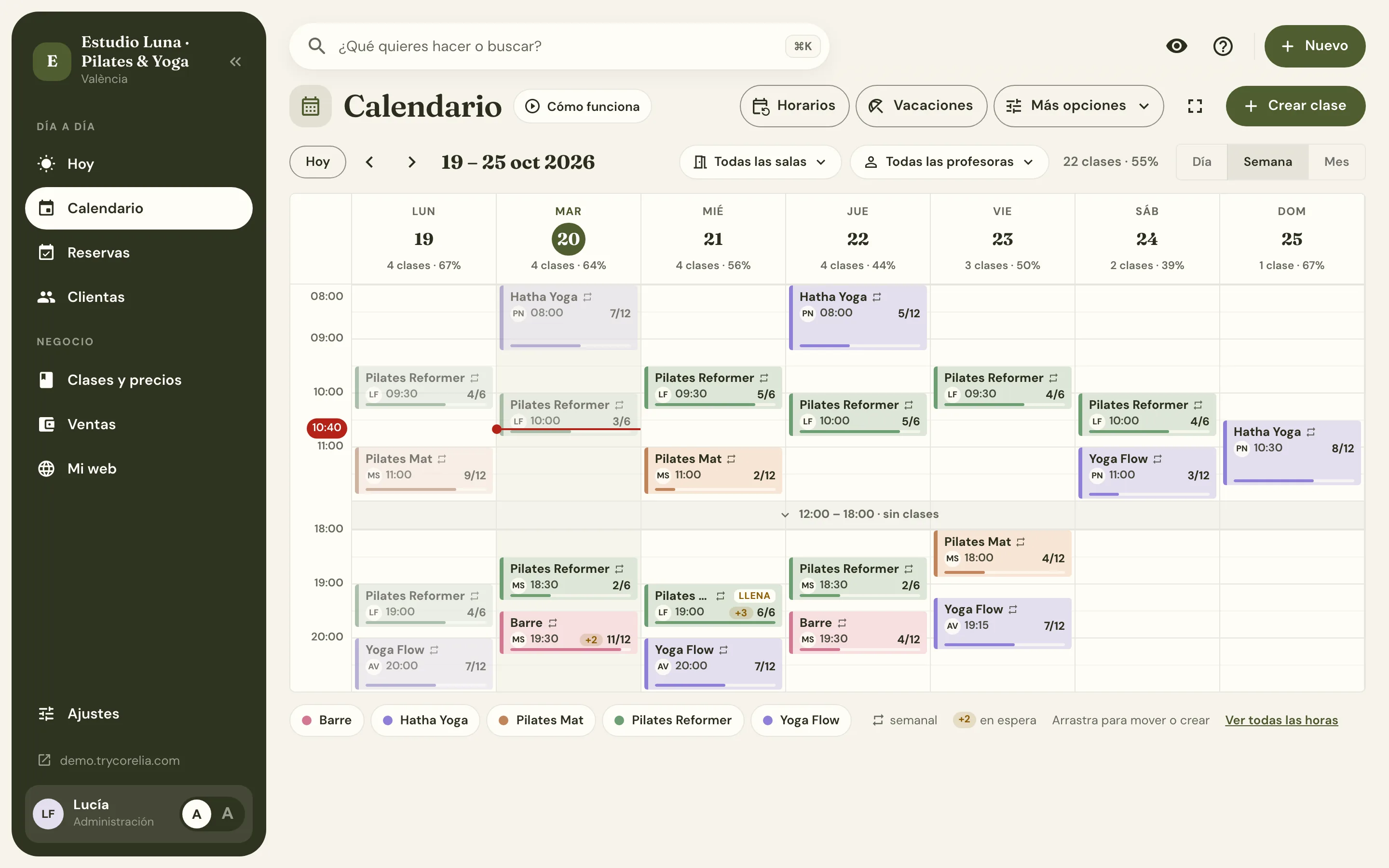
Panel: the week's calendar with each class's occupancy, a full class with 3 on the waiting list and the current time marked
Studio website on a phone: the day’s schedule with spots left and a Book button

Chapter 2 · Payments

Get paid your way: online, at the studio or both.

Sell drop-ins, class packs and memberships. Clients pay on their phone or at the front desk, and everything is recorded in one place.

  • Credits that make sense. Each class uses credits, and you decide how many each one is worth.
  • Packs and memberships that sell themselves. Online, with the payment methods people use in your country.
  • Cash, recorded too. Take it in person, log it in one tap and see who owes you.
Panel: “Classes & prices” with the five class types, their length, credits per class (Reformer 2) and drop-in price
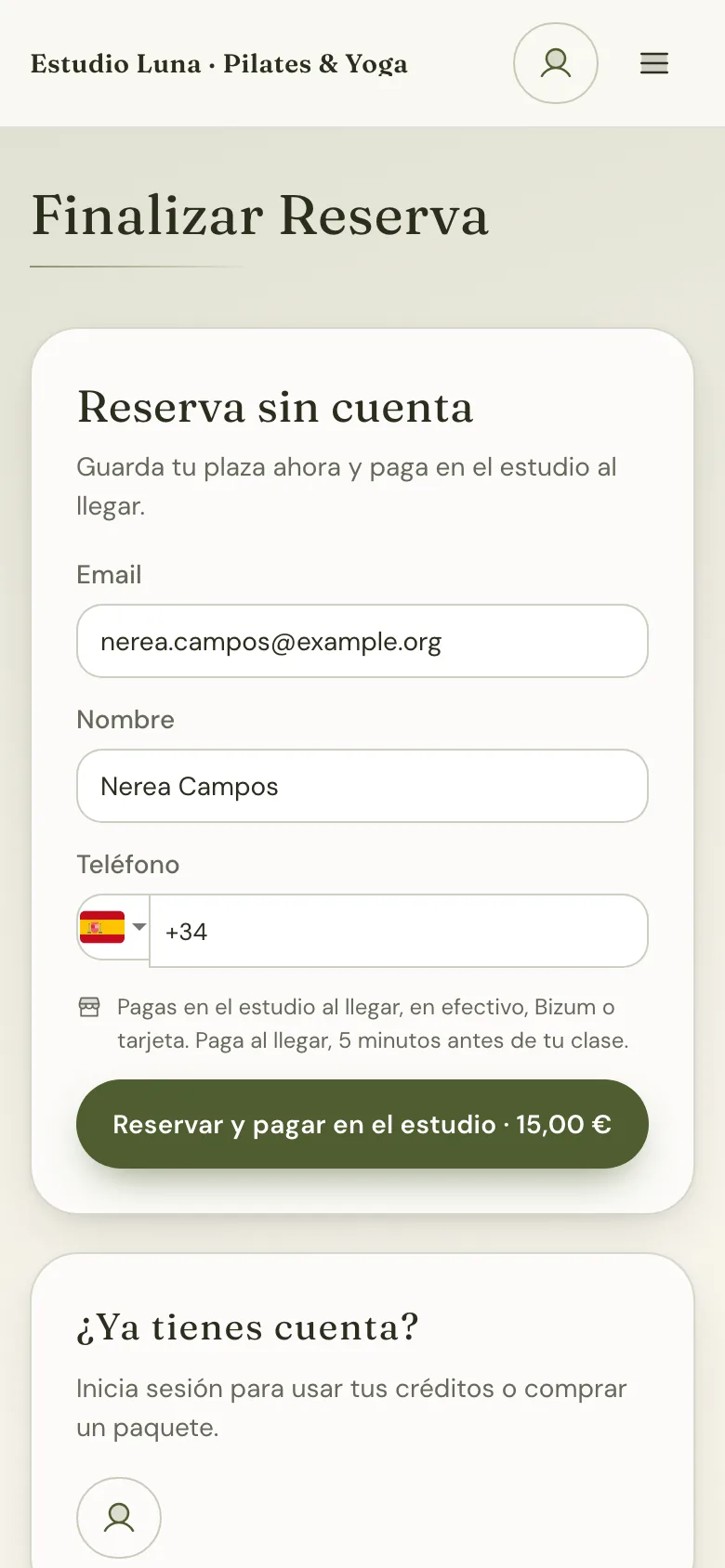
Studio website on a phone: book without an account and pay at the studio (cash, Bizum or card)

1 credit = 1 class

Clients buy credits (one at a time, in a pack or with their membership) and each class uses as many as you decide. So one pack works for all your classes.

A mat class costs 1 credit; a reformer class, 2.

What you sell

The three products you can sell, with sample prices
ProductHow it worksExample
Drop-in class Pay for one class and book it. Great for first-timers. $30 CAD
Credit pack A bundle of credits with an expiry date (e.g. 10 credits for 3 months). $260 CAD
Monthly membership Credits every month (e.g. 8 classes) that renew automatically. $189 CAD

Sample prices: you set your own, in your studio’s currency.

Two ways to get paid, at the same time if you like

  • Online Stripe handles it

    • Card, Apple Pay, Google Pay and your country’s local methods.
    • Money reaches your bank in 2–7 days.
    • Turn it on with “Connect payments” in about 10 minutes.
  • At the studio You keep track

    • Cash, bank transfer or card terminal.
    • Log the payment and give them credits or a recurring spot, with a monthly cut-off.
    • Everything shows up in “Sales” and “Who owes me”.

How clients pay, by country

Your studio’s country
  • Card
  • Apple Pay
  • Google Pay
  • Link
  • Bizum
  • SEPA · takes days
  • Card
  • Apple Pay
  • Google Pay
  • Link
  • MB WAY
  • Multibanco · takes days
  • SEPA · takes days
  • Card
  • Apple Pay
  • Google Pay
  • Link
  • OXXO · takes days
  • Card
  • Apple Pay
  • Google Pay
  • Link
  • Bacs · takes days
  • Card
  • Apple Pay
  • Google Pay
  • Link
  • ACH · takes days
  • Card
  • Apple Pay
  • Google Pay
  • PAD · takes days

Payments that take days to clear aren’t offered when booking a single class: only for packs and memberships.

0% Corelia fees. Just Stripe’s fee per card payment (in Canada, 2.9% + C$0.30).

Stripe’s standard fee for domestic cards, checked on October 16, 2026.

How payments work, step by step

Chapter 3 · Website & Google

Your website, ready to be found on Google and ChatGPT.

A multi-page website with your schedule, prices and map, built to show up when people search for classes nearby.

  • Several pages, no code. Home, schedule, pricing, team, contact and map.
  • Ready for search engines and AI assistants. Your classes, prices and contact details in a format Google and ChatGPT understand.
  • In English and Spanish, on your domain. Start at yourstudio.trycorelia.com and connect yourstudio.com on the Pro plan.
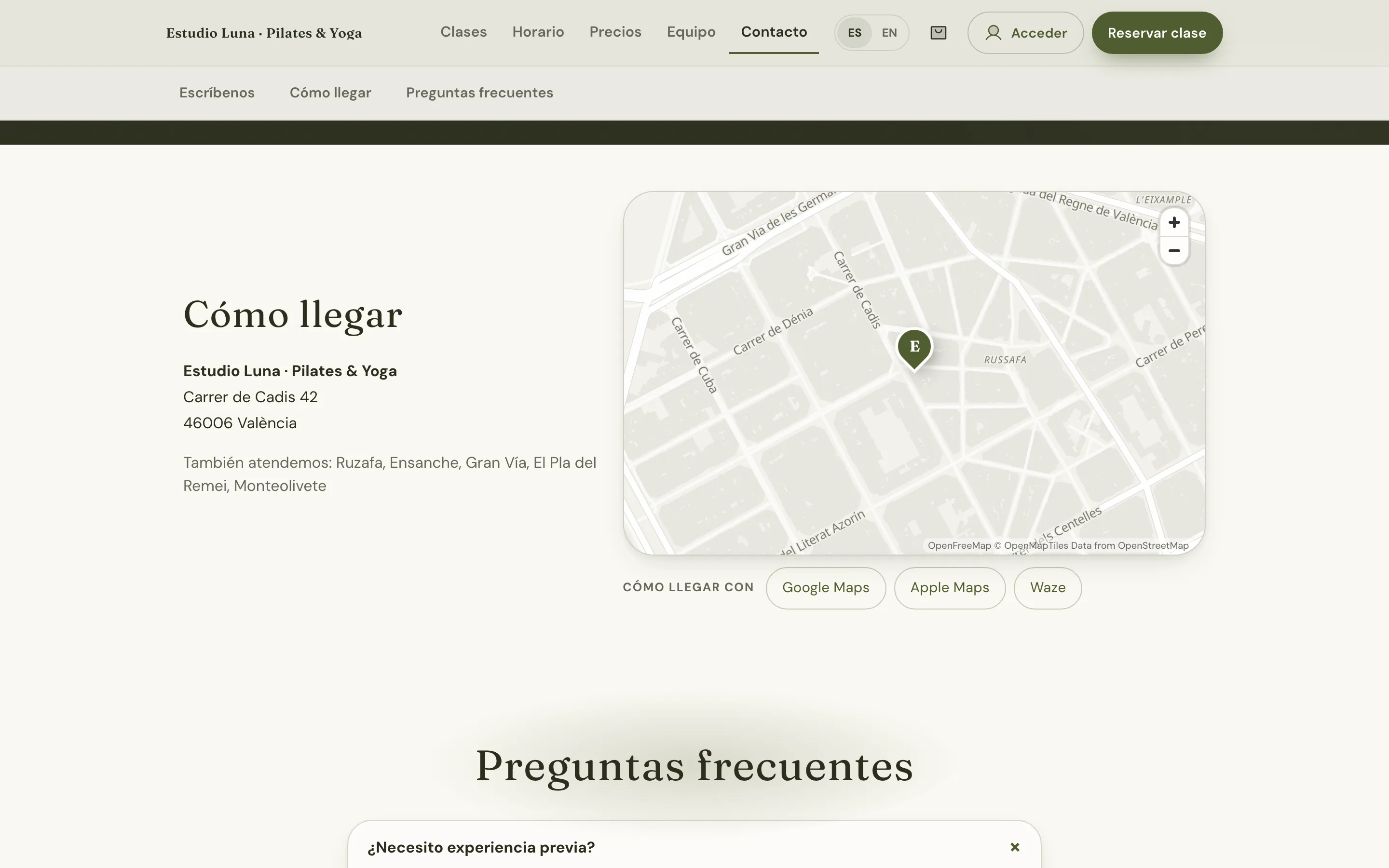
Studio website: “How to find us” with the minimalist map, the Ruzafa address and buttons to open directions
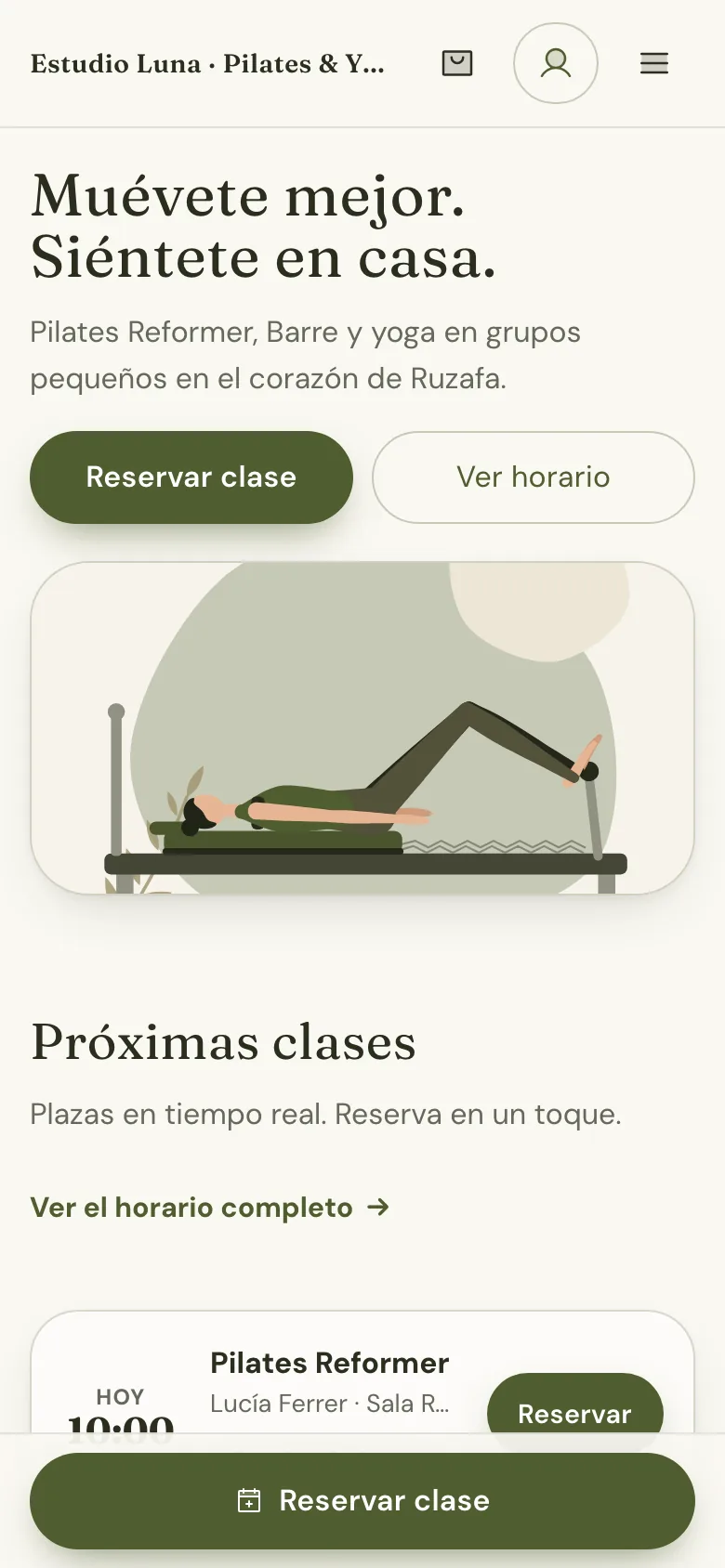
Studio website on a phone: home page with the headline and “Book a class”

Chapter 4 · App

Your app, with your icon, no app stores involved.

Clients install it from your website in two taps and get notifications on their phone.

  • Your name and your icon on their home screen.
  • Reminders that prevent no-shows: booking confirmed, a reminder before class and an open spot from the waitlist.
  • Included on every plan. No extra fee for having an app.
Studio website on a phone: the day’s schedule with spots left and a Book button

Chapter 5 · Brand

It looks like your studio, not like an app.

8 styles, 80 palettes, your fonts and your logo: across website, app and panel.

  • Pick a style and change it any time, without losing anything you’ve set up.
  • Your colours, fonts and logo on everything your clients see.
  • No “Made with Corelia” on the Pro and Multi-site plans: 100% your brand.
Calm
Bold
Main colour

Natural. Warm and calm, with earthy tones.

Change the look without losing anything you’ve set up.

What to show

Chapter 6 · Your day

Your day on one screen, on your phone too.

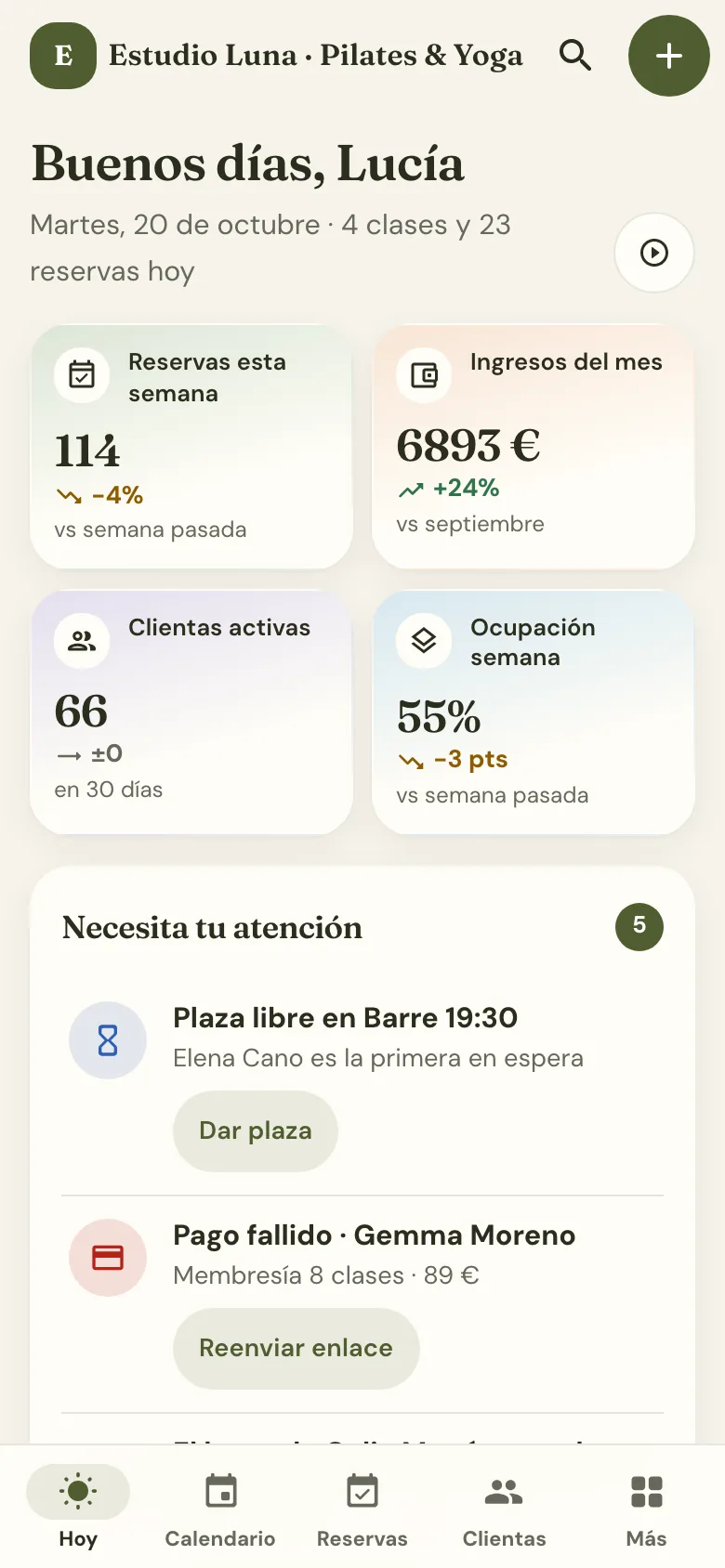
Open the panel and see who’s coming today, what’s still unpaid and what needs your attention.

  • “Today”, as soon as you open it: today’s classes, who’s coming and what’s pending.
  • A drag-and-drop calendar. Move a class to a new time by dragging it, without rebuilding the schedule.
  • Sales with a monthly close for your accountant. Online and in-person payments, month by month, ready to send.
Panel: the week's calendar with each class's occupancy, a full class with 3 on the waiting list and the current time marked
Panel on a phone: the Today screen with the week’s figures and alerts

No risk

Try it with peace of mind. We make it easy.

  • 2 months freeEverything included. You pay nothing until day 60.
  • No card neededSign up with your email. Add a card only if you decide to stay.
  • No contractMonth to month. Cancel from your panel any time.
  • We help you set upWe guide you step by step and, on Pro and Multi-site, we import your clients for you.
  • Your data is yoursClients, packs and bookings: download them whenever you like.

Pricing

Start free. Pay only if you love it.

2 months free with everything. You pay nothing until day 60, and if it’s not for you, no problem.

Billing

Suggested from your language and time zone. You can change it.

  • Essential

    To get started.

    $39 CAD /mo + tax

    $390 CAD /yr + tax

    Works out to $32.50 CAD/mo

    • 1 location, up to 100 active clients a month
    • Your site at yourstudio.trycorelia.com
    • Website, app and admin panel
    • Emails sent from the platform
    • Online payments straight to your account
    • Email support
  • Multi-site

    Several locations.

    $135 CAD /mo + tax

    $1,350 CAD /yr + tax

    Works out to $112.50 CAD/mo

    up to 3 locations · $25 CAD/mo per extra location

    • Everything in Pro
    • Unlimited clients*
    • One client account across all locations
    • Credits shared between locations
    • One panel for every location
    • Reports by location
    • Guided onboarding with our team

Your branded app, included. On other platforms it’s usually an extra: on Mindbody it’s a paid add-on and on Eversports it comes in a custom-priced package (according to their websites, checked October 15, 2026). Here it’s on every plan, from $39 CAD/mo.

*Only if your studio grows a lot (more than 1,000 active clients a month; on Multi-site, per location) will we talk about adjusting your plan. We never cut off bookings.

What’s an “active client”?

Someone who books or buys at your studio that month. Example: you have 140 clients on your list, but only 80 come in October: that month, 80 count. If a client doesn’t come one month, she doesn’t count.

Prices exclude GST/HST and provincial sales tax, which depend on your province. Yearly billing costs 10 months. On the Multi-site plan, each location from the fourth one adds $25 CAD/mo.

See pricing by country and all the details

Want to run it yourself? Corelia is open source: free for anyone who installs it on their own server. See the open-source version

An honest comparison

Versus generic booking apps.

This is how the most common booking apps usually work, and how Corelia works. Always check your own app’s terms.

Topic Generic apps Corelia
Free trial About 14 days 2 months, no card
App with your brand Often a paid extra Included in every plan
Booking fees Common, or a yearly contract None. No contract
Your own domain A profile on their site yourstudio.com (Pro plan)
Your data Whatever they let you download Always downloadable
Clients from a marketplace Some have one No: people find you through your site and Google

What we don’t have yet.

We’d rather you know before you start. Here’s what we don’t do yet, and where each thing stands.

See what we don’t do yet
  • Directory or marketplace Not planned That’s on purpose: there’s no shop window where your clients browse other studios. People find you through your site and Google, and they stay yours.
  • App Store and Google Play apps In development Today your app installs from your website, with your icon and notifications, no app store needed. Store versions are in development.
  • AI booking assistant Beta · in development An assistant that answers and books over WhatsApp, Instagram and your website, using your schedule and prices. We’re building it with our first studios. Join the waitlist
  • VeriFactu invoicing (Spain) In development In Spain, VeriFactu-compliant invoicing becomes mandatory in 2027. We’re getting compliant invoicing ready.
  • Bizum (Spain) Available for class packs Clients can already pay for class packs with Bizum, through your own payment account. What’s not there yet is Bizum for recurring monthly memberships: for now those are paid by card.
  • Wellhub and TotalPass Not planned for now If you work with them, those visits are still handled in their own apps for now.

A real story

Born at DOM Movement, a studio inside a dome in Estepona, Spain.

Corelia didn’t come out of an office: it was born at DOM Movement, a Pilates, yoga, barre and dance studio inside a geodesic dome in Selwo, Estepona (Málaga, Spain), next to Marbella. It uses it every day for its bookings, its credits and class packs and its clients.

  • Machine Pilates (Reformer and Chair), mat Pilates, yoga, barre and dance.
  • A drop-in class costs €12 (1 credit); machine classes use 2 credits.
  • Online booking in Spanish and English, even without an account.

Read the full case study Visit their website (opens in a new tab)

FAQ

What people ask us most.

Still have questions? Message us and a real person will get back to you.

Do I need to be good with technology?

No. If you can use WhatsApp, you can use this. The first time, we guide you step by step (schedule, prices, colours and logo), and if you get stuck, a real person on our team helps you.

Do I need a card?

Not to start. Sign up with your email and get 2 months free with everything included (Pro level). Add your card whenever you like from day 30; we don’t charge anything until day 60.

What happens after the 2 months?

We’ll remind you before it ends, by email and in your panel. If you stay, pick the plan that fits and add your card (you can do it from day 30): the first charge comes on day 60, never earlier. If you decide not to continue, we don’t charge you anything.

Do my clients need to download anything?

No: they book on your website. If they like, they can install it on their phone from the browser in two taps, no app store. On iPhone, notifications work once it’s added to the home screen.

Do you take a commission?

No, not per booking and not per payment. You pay your flat fee and that’s it. If you want to take card payments, you connect your own payment account (Stripe) and the money goes straight there: Stripe charges its usual fee, but we take nothing.

Can I take cash?

Yes. You don’t have to take payments online: sell the class pack at the studio (cash, card terminal or bank transfer), log it in your panel in a moment, and your client can book with it right away. Everything stays on record, however you get paid.

Is there a contract?

No. Pay monthly (or yearly, with two months free) and cancel anytime from your panel.

Is my data mine?

Yes, always. Download your clients, packs and bookings whenever you want. And since Corelia is open source, if you ever leave you can keep running it yourself with your data.

See more questions (9) See fewer questions
What happens if I don’t pay when the trial ends?

Your studio switches to read-only: your site still shows your schedule, but online bookings and purchases are paused. Your panel stays open so you can download your data. We keep it for 150 days and email you before deleting it. If you pick a plan before then, everything works again just as you left it. And if a payment fails later on, you have 7 days to fix it before your studio switches to read-only.

Are there any limits?

Essential is designed for up to 100 active clients a month (people who book or buy that month). Pro and Multi-site have no client limit: only if your studio grows a lot (more than 1,000 active clients a month; on Multi-site, per location) will we talk to you about adjusting your plan. If you go over in a given month, we’ll let you know and suggest the plan that fits, but we never cut off bookings.

Can I use my own domain?

Yes, on Pro (during the trial too). You start at yourstudio.trycorelia.com and connect yourstudio.com whenever you’re ready. No domain yet? We’ll show you how to buy one in your own name (usually around $10–15 a year, paid separately).

Which email address do my clients get notifications from?

On Essential, from the platform’s address with your studio’s name. On Pro, from your own Gmail or your domain’s email, so replies come straight to you.

What if I have several locations?

The Multi-site plan is for you: up to 3 locations for $135 CAD/mo (+$25 CAD per extra location), one account per client, credits that work at every location, one panel for all of them and reports by location. We’ll help you get set up.

Is it GDPR compliant? Where are the servers?

Our servers are in the European Union. When you sign up you accept the data processing agreement (GDPR Art. 28), and your site includes legal pages with your details. Your studio’s site doesn’t need advertising cookies.

Which languages does it come in?

Your clients’ site and app are in English and Spanish. The admin panel and emails are in Spanish for now — tell us if you need them in English.

Does it work outside Spain? Which currency?

Yes. When you sign up you choose your country and time zone, and your schedule and reminders run on your local time. We show Corelia’s prices in your currency (switch it with the “Country & currency” selector). Your clients pay online in your studio’s currency (pesos, dollars, euros…) through your own Stripe account, and your site shows prices in your country’s format.

Open source or Cloud? What’s the difference?

It’s the same software. With Corelia Cloud we handle everything (servers, backups, updates and support) and you’re up and running in 2 minutes. The open-source version is free if you host and maintain it yourself (about $5–10 a month for the server); support comes from the community.
Get your evenings back.

Sign up in 2 minutes and try it free for 2 months, with everything included.

  • 2 months free
  • No card needed
  • No contract